Reference Extension
The Reference Extension
The Reference Extension is a comprehensive example Extension that demonstrates all key features required for developing Extensions that integrate directly into mStudio. It serves as both a practical template and a learning resource.
Idea and Motivation
The Reference Extension was built to:
- demonstrate best practices for Extension development
- show all important marketplace concepts in practice
- illustrate integration with the mittwald API and mStudio
- serve as a starting point for your own Extension projects
The Extension is fully documented and can be used as a template for your own Extension development. The code is structured to be easy to understand, adapt, and extend.
Technology Stack
The Reference Extension uses modern web technologies that are also recommended for your own Extension development:
Frontend:
- React 19 - For implementing the user interface
- TanStack Router & Query - Routing and state management
- @mittwald/flow-remote-react-components - UI framework compatible with Frontend Fragments
- React Ghostmaker - Server function abstraction
Backend:
- TanStack Start - Full-stack React framework
- Drizzle ORM - Type-safe database operations with PostgreSQL
- @mittwald/api-client - Client for the mittwald API
- @weissaufschwarz/mitthooks - Webhook processing
Development Tools:
Implemented mStudio Marketplace Concepts
The Reference Extension demonstrates all key concepts relevant when building Extensions that should be embedded directly into mStudio:
1. Lifecycle webhooks
- Processing lifecycle events (
create,update,remove) to maintain state for existing Extension Instances - Storing instance data in its own database
- Validating webhook signatures to prevent misuse
You can read more about purpose and behavior in the Lifecycle webhooks concept.
2. Frontend Fragments
- Rendering UI components in mStudio via Remote DOM
- Integrating as a menu item in project context
- Using anchor point:
/projects/project/menu/section/extensions/item
In the "How to develop a Frontend Fragment" guide, you can find more details about Frontend Fragments and Remote DOM behavior.
3. mStudio API integration
- Session-token handling for secure communication
- Access-token usage for API authentication
- Reading and modifying project data
The Reference Extension includes middleware that provides both an access token and an authenticated mStudio API client. This client can be used to read and modify resources in mStudio.
It also includes several server functions that demonstrate how to use the middleware and API client. If you want to dive deeper into session-token authentication, read Authentication and session handling using session tokens.
4. Custom data persistence
- Own PostgreSQL database for extension-specific data
- Drizzle ORM for type-safe database operations
- Schema migrations with Drizzle Kit
Run the Reference Extension Locally
To develop and test the Reference Extension locally, some prerequisites and setup steps are required.
Prerequisites:
- Node.js 22+ (required)
- pnpm 9.14.4+ (package manager)
- Docker & Docker Compose (for PostgreSQL)
Clone the Reference Extension and Install Dependencies
Clone the Reference Extension and install dependencies:
# Clone repository
git clone https://github.com/mittwald/reference-extension.git
cd reference-extension

# Install dependencies
pnpm install
Configure Environment Variables
The Reference Extension requires multiple environment variables. Create a .env file in the project root:
cp .env.example .env
Even if you cannot set all required variables yet, you can already set the following:
EXTENSION_ID=
EXTENSION_SECRET=
ENCRYPTION_MASTER_PASSWORD=
ENCRYPTION_SALT=
EXTENSION_ID
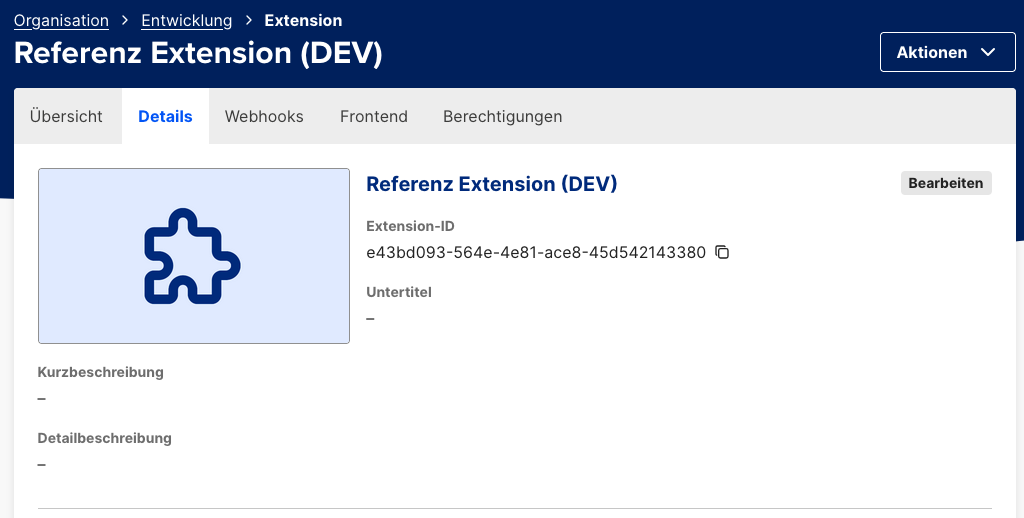
The Extension ID is a UUID generated during Extension registration and can be found in mStudio in tab "Details".
EXTENSION_SECRET
Now insert the Extension Secret generated earlier in Configure Extension.
ENCRYPTION_MASTER_PASSWORD and ENCRYPTION_SALT
The Reference Extension uses lifecycle webhooks to maintain state for running Extension Instances in its own database. During this process, an Extension Instance Secret is exchanged and must be stored securely in encrypted form. The Reference Extension handles the encryption process. For this, a master password and salt are required to derive a symmetric key.
Master password and salt are valid per Extension and do not need to differ per Extension Instance. The initialization vector (nonce) is generated automatically for each encryption, so identical plaintext values remain safely distinguishable.
To generate this secret pair, run the following package script in the Reference Extension:
pnpm init:encryption
This writes the generated secrets to the .env file.
Start the Development Environment
The Reference Extension depends on a database for persistence and uses PostgreSQL.
To simplify startup, the Reference Extension includes both docker-compose.yml and docker-compose.dev.yml.
Both can start the Extension with its dependencies.
docker-compose.dev.yml starts the Extension in development mode with hot reloading.
Run the following command to start the Extension:
pnpm run docker:dev
The database schema is applied automatically through migrations.
The Extension now runs on port 3000 and is reachable at http://localhost:3000.